Ugreen UG-90325 12-in-1 Fast Charge Universal Docking Station 2 x USB-A 3.2 Gen 1, 1 x USB-A Gen 2 Port, 2 x HDMI, 1 x DisplayPort Video Output, 1 x USB-C 3.2 Gen 2 Port, RJ45, USB-C Host Connection, Triple Display Support, 3.5mm Combo Audio Jack
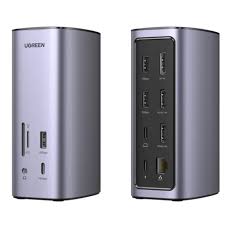
The Ugreen UG-90325 delivers comprehensive workstation connectivity through advanced DisplayLink technology and extensive port expansion. This aluminum-constructed docking station transforms single USB-C ports into twelve functional interfaces supporting triple 8K/4K displays, high-speed data transfer, and complete laptop charging. The CM555 model designation represents professional engineering for demanding multi-monitor and peripheral workflows.
Triple Display Architecture with DisplayLink Technology
The UG-90325 integrates two HDMI ports and one DisplayPort output utilizing DisplayLink chipset technology for advanced multi-monitor support. HDMI 2 port delivers 8K resolution at 30Hz refresh rate (7680 x 4320) for Windows systems, representing cutting-edge ultra-high-definition visual output. HDMI 1 and DisplayPort both support 4K resolution at 60Hz (3840 x 2160) for professional display configurations.
DisplayLink technology enables triple extended desktop mode on both Windows and macOS systems. Consequently, professionals operate with laptop screen plus three external monitors creating quad-screen workspaces. Windows systems support true extended mode where each monitor displays independent content. macOS systems also support extended mode through DisplayLink Manager software, overcoming native platform limitations.
Furthermore, dual-monitor configurations maximize resolution capabilities. Single 8K@30Hz display connects via HDMI 2 for ultra-high-definition content creation. Dual 4K@60Hz displays connect via HDMI 1 and DisplayPort for balanced multi-monitor workflows. All video outputs support mirror and extended display modes with flexible arrangement options.
Additionally, DisplayLink driver installation is mandatory before initial use. The docking station includes embedded driver storage accessible through mounted drive upon connection. Windows systems receive automatic driver updates through DisplayLink’s dedicated software. macOS users install DisplayLink Manager application enabling full multi-display functionality.
USB 3.2 Gen 2 High-Speed Data Architecture
The UG-90325 integrates advanced USB architecture with one USB-C 3.2 Gen 2 port and one USB-A 3.2 Gen 2 port both operating at 10Gbps theoretical bandwidth. These Gen 2 ports handle external NVMe SSDs, high-resolution capture devices, and professional audio interfaces without bandwidth limitations. Large file transfers complete rapidly at speeds reaching 1250 MB/s theoretical maximum.
Additionally, two USB-A 3.0 ports operate at 5Gbps for moderate-speed peripherals. This mixed-speed configuration optimizes bandwidth allocation across connected devices. The 10Gbps ports transfer 20GB files in approximately 20 seconds when connected to compatible SSDs. All USB ports feature backward compatibility with USB 2.0 and USB 1.1 standards.
Moreover, the USB-C 3.2 Gen 2 data port provides modern connectivity for latest-generation peripherals. External storage devices, webcams, and USB-C accessories connect through this high-speed port without adapters. The USB-A 3.2 Gen 2 port accommodates traditional USB peripherals at maximum transfer speeds.
Furthermore, the two USB-A 3.0 ports positioned on back panel accommodate permanent peripheral connections. Keyboards, mice, wireless adapters, and other constant-use devices connect through these ports. The strategic port placement separates frequently-accessed front ports from permanent back-panel connections.
Power Delivery 3.0 Charging System
USB-C Power Delivery 3.0 protocol supports 100W input with up to 85W pass-through charging to connected laptops. The docking station reserves 15W for internal operation ensuring stable performance across all twelve ports. MacBook Pro 15-inch models charge fully in approximately 1.5 hours while simultaneously utilizing all hub functions.
Furthermore, the PD port requires connection to laptop’s power adapter for optimal multi-display and peripheral operation. Dell XPS 15, HP Spectre x360, Surface laptops, and ThinkPad models receive sufficient power for intensive workloads. The 85W delivery specification accommodates high-performance laptops requiring substantial power during docked operation.
Additionally, the dedicated PD 3.0 port prevents charging interference with data transfer operations. Users connect laptop charger to PD port enabling uninterrupted power delivery during file transfers. The power management system distributes electricity efficiently across all connected peripherals without voltage drops.
Moreover, the 100W input specification supports future high-power laptop models. Modern workstation laptops consuming 85W receive full charging capacity. The power delivery system employs intelligent negotiation determining optimal voltage and amperage for connected devices.
Gigabit Ethernet Wired Connectivity
The integrated RJ45 port delivers 1000Mbps Gigabit Ethernet with auto-negotiation supporting 10/100/1000Mbps standards. Network connections operate through DisplayLink chipset architecture requiring driver installation for functionality. Consequently, network traffic maintains stable performance during multi-display operation.
Moreover, wired Ethernet connections eliminate wireless interference critical for video conferencing and real-time collaboration. The stable connection supports large file uploads to cloud storage and rapid access to network-attached storage systems. Professional applications benefit from consistent low-latency networking during collaborative work sessions.
Additionally, the Ethernet port supports IEEE 802.3 full-duplex and half-duplex operation modes. Cable compatibility includes Cat5e, Cat6, Cat6a, and Cat7 specifications. Gaming applications achieve reduced ping times and consistent packet delivery compared to wireless alternatives.
Furthermore, network functionality activates after DisplayLink driver installation. The RJ45 port shares chipset resources with HDMI 1 and DisplayPort outputs ensuring coordinated operation. Network speeds reach full Gigabit capacity when properly configured with compatible network infrastructure.
SD and TF Card Reader Integration
Simultaneous dual card slots support SD and microSD (TF) formats with transfer speeds reaching 104MB/s. Both card readers recognize SDXC, SDHC, microSDXC, and microSDHC formats up to 2TB capacity. Photographers transfer high-resolution RAW images directly from camera media without external card reader devices.
Additionally, the dual-slot design enables rapid backup workflows between multiple memory cards. Video production professionals import 8K footage from camera cards while simultaneously accessing archived media on secondary cards. The SD 3.0 specification support ensures maximum performance from modern high-speed memory cards.
Furthermore, simultaneous card reading operations enable efficient media management. Content creators transfer files from camera SD cards to laptop while backing up previous projects from microSD cards. The card readers operate independently without bandwidth sharing conflicts.
Moreover, the card slots accommodate full-size SD cards and microSD cards without adapters. Spring-loaded mechanisms secure cards during transfer operations. The readers support hot-swapping enabling card changes without system restarts.
3.5mm Audio Jack Connectivity
The integrated 3.5mm combo audio jack provides universal audio input/output for headphones, speakers, and microphones. This TRRS connector supports stereo audio output, microphone input, volume control, and playback functions. The audio port operates independently from other hub functions allowing simultaneous audio during data transfer operations.
Furthermore, the 3.5mm jack eliminates the need for separate USB audio adapters. Users connect professional headphones, powered speakers, conference room audio systems, or external microphones directly through the hub. The audio jack supports standard headphone connections and four-pole TRRS microphone combinations.
Additionally, the audio port delivers clear signal quality for music production, video editing, and voice communication applications. Volume control and playback functions operate through inline remote controls on compatible headphones. The jack accommodates standard 3.5mm TRS and TRRS connector types.
Moreover, the audio functionality includes microphone input supporting conference calls and voice recording. External microphones connect for improved audio capture quality during video conferences. The combo jack configuration maximizes functionality within single port design.
Aluminum Alloy Construction and Thermal Management
Premium aluminum alloy housing provides structural durability while facilitating passive heat dissipation from internal DisplayLink chipset. The metal construction transfers thermal energy away from components during extended multi-port operation. Compact dimensions of approximately 115.5mm x 176.3mm x 82mm enable desktop placement without consuming excessive workspace.
Additionally, the substantial metal chassis delivers professional aesthetics complementing modern workspace environments. The silver aluminum finish matches MacBook and premium laptop designs. Ventilation architecture enables passive cooling without fan noise during operation.
Furthermore, the aluminum casing delivers superior heat dissipation compared to plastic alternatives. Passive cooling maintains optimal operating temperatures during simultaneous triple-display and high-speed data transfer operations. The durable construction withstands daily transport and workplace handling.
Moreover, the integrated 15cm USB-C cable connects directly to host devices without additional cable requirements. The detachable cable design enables replacement if damaged. Professional cable management maintains organized workspace appearance.
DisplayLink Driver Requirements and Setup
The UG-90325 requires DisplayLink driver installation before initial use for video and network functionality. Driver installation methods include embedded CD drive image, MediaFire download link, or DisplayLink official website. Windows 10/11 systems may receive automatic driver installation through Windows Update.
Furthermore, DisplayLink Manager software enables full functionality on macOS systems. The software provides display configuration, network settings, and driver updates. Automatic startup configuration ensures docking station functionality after system restart.
Additionally, DisplayLink technology enables extended desktop mode on macOS overcoming native platform limitations. Multiple external monitors display independent content through DisplayLink driver architecture. This represents significant advantage over standard USB-C hubs limited to mirror mode on macOS.
Moreover, driver updates maintain compatibility with latest operating system versions. DisplayLink releases regular updates addressing bugs and adding features. Users access updates through DisplayLink Manager application or manual downloads.
Cross-Platform Compatibility
The adapter supports Windows XP/7/8/8.1/10/11 and macOS systems with DisplayLink driver installation. Linux systems with compatible DisplayLink drivers also operate with the docking station. USB-C ports with DisplayPort Alt Mode enable full functionality on compatible devices.
Furthermore, the UG-90325 operates with USB-C enabled laptops including MacBook Pro, MacBook Air, Dell XPS, HP Spectre x360, Surface Pro, ASUS Zenbook, ThinkPad X1 Carbon, and Lenovo Yoga models. Thunderbolt 3 and Thunderbolt 4 ports provide complete compatibility with all adapter features.
Additionally, DisplayLink technology enables triple extended display on both Windows and macOS systems. This represents unique capability among USB-C docking stations. Users access true multi-monitor productivity on any compatible operating system.
Moreover, compatibility extends to various laptop manufacturers and models. The universal USB-C connection supports diverse device ecosystem. DisplayLink architecture ensures consistent functionality across different hardware configurations.
I’ll create a comprehensive product description for the Ugreen UG-90325 12-in-1 docking station based on the specifications gathered earlier.
Ugreen UG-90325 12-in-1 Fast Charge Universal Docking Station
The Ugreen UG-90325 delivers comprehensive workstation connectivity through advanced DisplayLink technology and extensive port expansion. This aluminum-constructed docking station transforms single USB-C ports into twelve functional interfaces supporting triple 8K/4K displays, high-speed data transfer, and complete laptop charging. The CM555 model designation represents professional engineering for demanding multi-monitor and peripheral workflows.
Triple Display Architecture with DisplayLink Technology
The UG-90325 integrates two HDMI ports and one DisplayPort output utilizing DisplayLink chipset technology for advanced multi-monitor support. HDMI 2 port delivers 8K resolution at 30Hz refresh rate (7680 x 4320) for Windows systems, representing cutting-edge ultra-high-definition visual output. HDMI 1 and DisplayPort both support 4K resolution at 60Hz (3840 x 2160) for professional display configurations.
DisplayLink technology enables triple extended desktop mode on both Windows and macOS systems. Consequently, professionals operate with laptop screen plus three external monitors creating quad-screen workspaces. Windows systems support true extended mode where each monitor displays independent content. macOS systems also support extended mode through DisplayLink Manager software, overcoming native platform limitations.
Furthermore, dual-monitor configurations maximize resolution capabilities. Single 8K@30Hz display connects via HDMI 2 for ultra-high-definition content creation. Dual 4K@60Hz displays connect via HDMI 1 and DisplayPort for balanced multi-monitor workflows. All video outputs support mirror and extended display modes with flexible arrangement options.
Additionally, DisplayLink driver installation is mandatory before initial use. The docking station includes embedded driver storage accessible through mounted drive upon connection. Windows systems receive automatic driver updates through DisplayLink’s dedicated software. macOS users install DisplayLink Manager application enabling full multi-display functionality.
USB 3.2 Gen 2 High-Speed Data Architecture
The UG-90325 integrates advanced USB architecture with one USB-C 3.2 Gen 2 port and one USB-A 3.2 Gen 2 port both operating at 10Gbps theoretical bandwidth. These Gen 2 ports handle external NVMe SSDs, high-resolution capture devices, and professional audio interfaces without bandwidth limitations. Large file transfers complete rapidly at speeds reaching 1250 MB/s theoretical maximum.
Additionally, two USB-A 3.0 ports operate at 5Gbps for moderate-speed peripherals. This mixed-speed configuration optimizes bandwidth allocation across connected devices. The 10Gbps ports transfer 20GB files in approximately 20 seconds when connected to compatible SSDs. All USB ports feature backward compatibility with USB 2.0 and USB 1.1 standards.
Moreover, the USB-C 3.2 Gen 2 data port provides modern connectivity for latest-generation peripherals. External storage devices, webcams, and USB-C accessories connect through this high-speed port without adapters. The USB-A 3.2 Gen 2 port accommodates traditional USB peripherals at maximum transfer speeds.
Furthermore, the two USB-A 3.0 ports positioned on back panel accommodate permanent peripheral connections. Keyboards, mice, wireless adapters, and other constant-use devices connect through these ports. The strategic port placement separates frequently-accessed front ports from permanent back-panel connections.
Power Delivery 3.0 Charging System
USB-C Power Delivery 3.0 protocol supports 100W input with up to 85W pass-through charging to connected laptops. The docking station reserves 15W for internal operation ensuring stable performance across all twelve ports. MacBook Pro 15-inch models charge fully in approximately 1.5 hours while simultaneously utilizing all hub functions.
Furthermore, the PD port requires connection to laptop’s power adapter for optimal multi-display and peripheral operation. Dell XPS 15, HP Spectre x360, Surface laptops, and ThinkPad models receive sufficient power for intensive workloads. The 85W delivery specification accommodates high-performance laptops requiring substantial power during docked operation.
Additionally, the dedicated PD 3.0 port prevents charging interference with data transfer operations. Users connect laptop charger to PD port enabling uninterrupted power delivery during file transfers. The power management system distributes electricity efficiently across all connected peripherals without voltage drops.
Moreover, the 100W input specification supports future high-power laptop models. Modern workstation laptops consuming 85W receive full charging capacity. The power delivery system employs intelligent negotiation determining optimal voltage and amperage for connected devices.
Gigabit Ethernet Wired Connectivity
The integrated RJ45 port delivers 1000Mbps Gigabit Ethernet with auto-negotiation supporting 10/100/1000Mbps standards. Network connections operate through DisplayLink chipset architecture requiring driver installation for functionality. Consequently, network traffic maintains stable performance during multi-display operation.
Moreover, wired Ethernet connections eliminate wireless interference critical for video conferencing and real-time collaboration. The stable connection supports large file uploads to cloud storage and rapid access to network-attached storage systems. Professional applications benefit from consistent low-latency networking during collaborative work sessions.
Additionally, the Ethernet port supports IEEE 802.3 full-duplex and half-duplex operation modes. Cable compatibility includes Cat5e, Cat6, Cat6a, and Cat7 specifications. Gaming applications achieve reduced ping times and consistent packet delivery compared to wireless alternatives.
Furthermore, network functionality activates after DisplayLink driver installation. The RJ45 port shares chipset resources with HDMI 1 and DisplayPort outputs ensuring coordinated operation. Network speeds reach full Gigabit capacity when properly configured with compatible network infrastructure.
SD and TF Card Reader Integration
Simultaneous dual card slots support SD and microSD (TF) formats with transfer speeds reaching 104MB/s. Both card readers recognize SDXC, SDHC, microSDXC, and microSDHC formats up to 2TB capacity. Photographers transfer high-resolution RAW images directly from camera media without external card reader devices.
Additionally, the dual-slot design enables rapid backup workflows between multiple memory cards. Video production professionals import 8K footage from camera cards while simultaneously accessing archived media on secondary cards. The SD 3.0 specification support ensures maximum performance from modern high-speed memory cards.
Furthermore, simultaneous card reading operations enable efficient media management. Content creators transfer files from camera SD cards to laptop while backing up previous projects from microSD cards. The card readers operate independently without bandwidth sharing conflicts.
Moreover, the card slots accommodate full-size SD cards and microSD cards without adapters. Spring-loaded mechanisms secure cards during transfer operations. The readers support hot-swapping enabling card changes without system restarts.
3.5mm Audio Jack Connectivity
The integrated 3.5mm combo audio jack provides universal audio input/output for headphones, speakers, and microphones. This TRRS connector supports stereo audio output, microphone input, volume control, and playback functions. The audio port operates independently from other hub functions allowing simultaneous audio during data transfer operations.
Furthermore, the 3.5mm jack eliminates the need for separate USB audio adapters. Users connect professional headphones, powered speakers, conference room audio systems, or external microphones directly through the hub. The audio jack supports standard headphone connections and four-pole TRRS microphone combinations.
Additionally, the audio port delivers clear signal quality for music production, video editing, and voice communication applications. Volume control and playback functions operate through inline remote controls on compatible headphones. The jack accommodates standard 3.5mm TRS and TRRS connector types.
Moreover, the audio functionality includes microphone input supporting conference calls and voice recording. External microphones connect for improved audio capture quality during video conferences. The combo jack configuration maximizes functionality within single port design.
Aluminum Alloy Construction and Thermal Management
Premium aluminum alloy housing provides structural durability while facilitating passive heat dissipation from internal DisplayLink chipset. The metal construction transfers thermal energy away from components during extended multi-port operation. Compact dimensions of approximately 115.5mm x 176.3mm x 82mm enable desktop placement without consuming excessive workspace.
Additionally, the substantial metal chassis delivers professional aesthetics complementing modern workspace environments. The silver aluminum finish matches MacBook and premium laptop designs. Ventilation architecture enables passive cooling without fan noise during operation.
Furthermore, the aluminum casing delivers superior heat dissipation compared to plastic alternatives. Passive cooling maintains optimal operating temperatures during simultaneous triple-display and high-speed data transfer operations. The durable construction withstands daily transport and workplace handling.
Moreover, the integrated 15cm USB-C cable connects directly to host devices without additional cable requirements. The detachable cable design enables replacement if damaged. Professional cable management maintains organized workspace appearance.
DisplayLink Driver Requirements and Setup
The UG-90325 requires DisplayLink driver installation before initial use for video and network functionality. Driver installation methods include embedded CD drive image, MediaFire download link, or DisplayLink official website. Windows 10/11 systems may receive automatic driver installation through Windows Update.
Furthermore, DisplayLink Manager software enables full functionality on macOS systems. The software provides display configuration, network settings, and driver updates. Automatic startup configuration ensures docking station functionality after system restart.
Additionally, DisplayLink technology enables extended desktop mode on macOS overcoming native platform limitations. Multiple external monitors display independent content through DisplayLink driver architecture. This represents significant advantage over standard USB-C hubs limited to mirror mode on macOS.
Moreover, driver updates maintain compatibility with latest operating system versions. DisplayLink releases regular updates addressing bugs and adding features. Users access updates through DisplayLink Manager application or manual downloads.
Cross-Platform Compatibility
The adapter supports Windows XP/7/8/8.1/10/11 and macOS systems with DisplayLink driver installation. Linux systems with compatible DisplayLink drivers also operate with the docking station. USB-C ports with DisplayPort Alt Mode enable full functionality on compatible devices.
Furthermore, the UG-90325 operates with USB-C enabled laptops including MacBook Pro, MacBook Air, Dell XPS, HP Spectre x360, Surface Pro, ASUS Zenbook, ThinkPad X1 Carbon, and Lenovo Yoga models. Thunderbolt 3 and Thunderbolt 4 ports provide complete compatibility with all adapter features.
Additionally, DisplayLink technology enables triple extended display on both Windows and macOS systems. This represents unique capability among USB-C docking stations. Users access true multi-monitor productivity on any compatible operating system.
Moreover, compatibility extends to various laptop manufacturers and models. The universal USB-C connection supports diverse device ecosystem. DisplayLink architecture ensures consistent functionality across different hardware configurations.
Ideal User Applications
Video Editors and Content Creators
- 8K@30Hz output on HDMI 2 enables ultra-high-definition content editing and preview
- Triple 4K display configuration separates timeline, preview, and asset management
- 10Gbps USB ports facilitate rapid transfer of 8K video project files
- SD/TF card readers provide direct camera media access eliminating workflow bottlenecks
Graphic Designers and Digital Artists
- Triple display configuration separates canvas workspace, tool palettes, and reference materials
- DisplayLink extended mode on macOS enables true multi-monitor productivity
- USB 3.2 Gen 2 ports connect graphics tablets and color calibration devices
- 8K resolution provides exceptional detail for high-resolution design work
Software Developers and Programmers
- Quad-screen setup displays code editor, terminal windows, documentation, and debugging tools simultaneously
- Gigabit Ethernet ensures stable connections for repository access and continuous integration
- 10Gbps USB ports support external storage for version control systems
- DisplayLink functionality enables consistent multi-monitor setup across operating systems
Financial Analysts and Stock Traders
- Quad display configuration shows market data feeds, trading platforms, analysis charts, and news feeds
- Wired Ethernet eliminates network latency critical for real-time trading decisions
- Extended desktop mode on both Windows and macOS ensures consistent workspace
- Multiple display outputs accommodate various market monitoring applications
Photographers and Videographers
- 8K display output enables pixel-perfect review of ultra-high-resolution images and video
- SD/TF card readers streamline workflow from camera to computer
- Triple monitor configuration shows editing interface, preview, and reference images
- 100W PD charging supports extended on-location editing sessions
Technical Specifications
Connectivity Interfaces
- Host Connection: USB-C Male (USB 3.2, DisplayPort Alt Mode Required)
- USB-C Data Port: 1x USB 3.2 Gen 2 (10Gbps) Female
- USB-A High-Speed: 1x USB 3.2 Gen 2 (10Gbps) Female
- USB-A Standard: 2x USB 3.0 (5Gbps) Female
- USB-C Power Port: 1x USB-C PD 3.0 (100W Input, 85W Output)
- Video Outputs: 2x HDMI Female + 1x DisplayPort Female
- Network: 1x RJ45 Gigabit Ethernet (10/100/1000 Mbps)
- Card Readers: 1x SD Slot + 1x TF/microSD Slot
- Audio: 1x 3.5mm TRRS Combo Audio Jack
Display Specifications
- HDMI 2 Maximum: 7680 x 4320 @ 30Hz (8K UHD) – Windows Only
- HDMI 2 macOS: 3840 x 2160 @ 60Hz (4K UHD)
- HDMI 1 Maximum: 3840 x 2160 @ 60Hz (4K UHD)
- DisplayPort Maximum: 3840 x 2160 @ 60Hz (4K UHD)
- HDMI Standard: HDMI 2.1 (HDMI 2) / HDMI 2.0 (HDMI 1)
- DisplayPort Standard: DP 1.4
- Extended Mode: Windows and macOS (DisplayLink required)
- Mirror Mode: Windows and macOS compatible
- DisplayLink: Required for video and network functionality
Data Transfer Performance
- USB 3.2 Gen 2 Rate: 10Gbps (1250 MB/s theoretical)
- USB 3.0 Rate: 5Gbps (625 MB/s theoretical)
- Network Speed: 1000Mbps Gigabit (backward compatible 100/10Mbps)
- SD/TF Card Speed: 104MB/s (SD 3.0 specification)
- Power Delivery: 100W input, 85W pass-through charging
- Backward Compatibility: USB 2.0, USB 1.1 support
Physical Specifications
- Dimensions: 115.5mm x 176.3mm x 82mm (4.5″ x 6.9″ x 3.2″)
- Weight: Approximately 1.6kg (3.53 pounds) with packaging
- Housing Material: Aluminum Alloy
- Construction: Metal chassis with passive cooling
- Cable Type: Detachable USB-C cable (15cm/6 inches)
- Color Finish: Silver aluminum
Platform Compatibility
- Windows: XP, 7, 8, 8.1, 10, 11 (DisplayLink driver required)
- macOS: All versions (DisplayLink Manager required)
- Linux: Compatible distributions with DisplayLink driver support
- Thunderbolt: Thunderbolt 3 and Thunderbolt 4 compatible
- DisplayLink: Mandatory driver installation for video and network
Operational Requirements
- Driver Installation: Required for display and network functionality
- Power Source: USB-C PD charger required for optimal performance
- Host Port Requirements: USB-C with DisplayPort Alt Mode
- External Power Adapter: Use laptop’s USB-C PD charger (minimum 65W recommended)
- Driver Source: Embedded CD image, MediaFire, or DisplayLink website
Card Reader Specifications
- SD Card Support: SDXC, SDHC, SD (up to 2TB capacity)
- TF Card Support: microSDXC, microSDHC, microSD (up to 2TB capacity)
- Interface Standard: SD 3.0 (UHS-I support)
- Transfer Speed: Up to 104MB/s read/write
- Simultaneous Operation: Both card slots function concurrently
- File System: FAT32, exFAT, NTFS compatible
USB Port Specifications
- USB-C 3.2 Gen 2: 10Gbps bandwidth, backward compatible
- USB-A 3.2 Gen 2: 10Gbps bandwidth, backward compatible
- USB-A 3.0: 5Gbps bandwidth x2, backward compatible USB 2.0/1.1
- Maximum Current: Varies by port, PD port handles laptop charging
Audio Specifications
- Audio Port: 3.5mm TRRS combo jack
- Functions: Audio output, microphone input, inline controls
- Supported Devices: Headphones, speakers, microphones, headsets
- Signal Quality: Clear audio for multimedia applications
- Connector Type: Standard 3.5mm TRS and TRRS compatible
Network Specifications
- Ethernet Standard: IEEE 802.3 Gigabit Ethernet
- Transfer Rates: 10/100/1000 Mbps auto-negotiation
- Duplex Mode: Full-duplex and half-duplex support
- Connector Type: RJ45 Female
- Cable Support: Cat5e, Cat6, Cat6a, Cat7 Ethernet cables
- Driver Requirement: DisplayLink driver enables network functionality