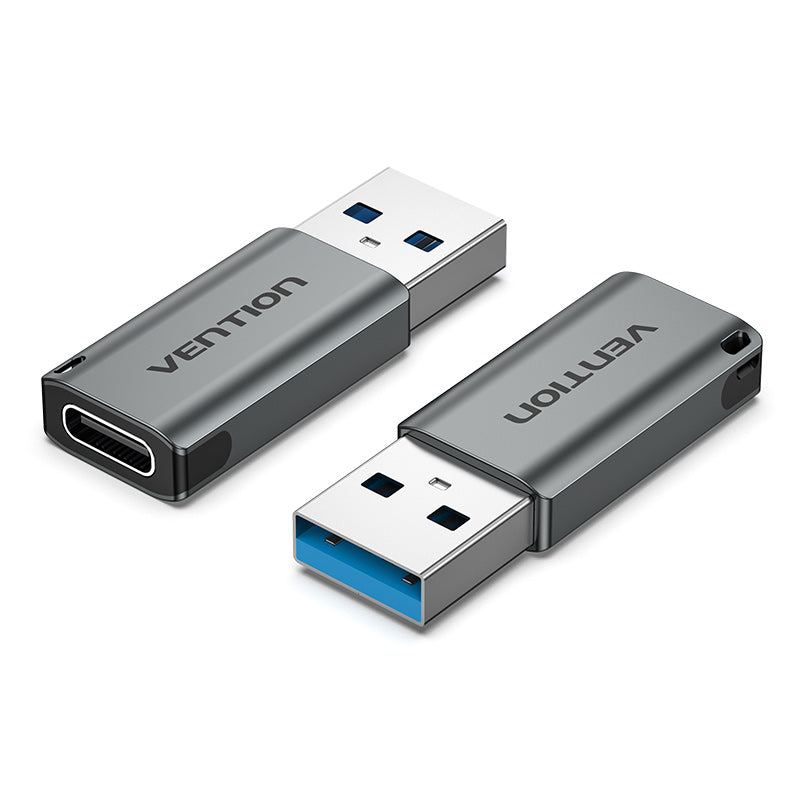
Vention USB 3.0 Male to USB-C Female Adapter Gray Aluminum Alloy Type
The Vention USB 3.0 Male to USB-C Female Adapter transforms standard USB-A ports into USB-C connections for modern devices and accessories. This compact adapter supports up to 5Gbps data transfer speeds while enabling device charging through its aluminum alloy construction. It’s designed for users who need to connect USB-C cables and devices to computers, chargers, and peripherals equipped with traditional USB-A ports.
Technical Specifications
Connectivity
- Input Connector: USB 3.0 Type-A Male (9-pin)
- Output Connector: USB Type-C Female
- Data Transfer Rate: Up to 5Gbps (SuperSpeed USB 3.0)
- Power Support: Up to 5V/3A (15W)
- Reversible Design: USB-C female port accepts reversible insertion
Physical Characteristics
- Housing Material: Aluminum alloy
- Color: Gray
- Dimensions: Approximately 25mm × 15mm × 8mm
- Weight: ~5 grams
- Connector Finish: Nickel-plated contacts
Performance Standards
- USB Specification: USB 3.0/USB 3.1 Gen 1 compliant
- USB-C Standard: USB Type-C specification
- Backward Compatibility: USB 2.0, USB 1.1
- Safety Certifications: RoHS compliant
- Operating Temperature: -20°C to 60°C
Use Cases & Applications
Legacy Computer Connectivity
The Vention USB 3.0 Male to USB-C Female Adapter enables older laptops and desktop computers with USB-A ports to connect modern USB-C devices. Plug the adapter into any standard USB port, then connect your USB-C cable for immediate compatibility. This eliminates the need to purchase separate USB-A cables for legacy systems.
Charging Infrastructure Extension
Convert existing USB-A wall chargers, car chargers, and power banks into USB-C compatible charging stations. Simply insert the adapter into your current charger, then connect any USB-C charging cable. This approach maximizes the utility of your existing charging accessories without replacing them entirely.
External Storage Access
Connect USB-C external SSDs, hard drives, and flash drives to computers and devices that only feature USB-A ports. The adapter preserves full USB 3.0 transfer speeds, ensuring quick access to large media files, backup archives, and portable storage libraries.
Mobile Device Management
Sync and charge USB-C smartphones and tablets using existing USB-A computer ports and charging equipment. This proves particularly valuable in office environments where infrastructure upgrades happen gradually, allowing USB-C device users to work effectively with available ports.
Travel and Mobile Work
Carry this compact adapter to ensure connectivity anywhere, regardless of available port types. The lightweight design adds minimal bulk to laptop bags while providing crucial compatibility when working from hotels, airports, co-working spaces, or client offices with varying equipment standards.
Audio Equipment Integration
Connect USB-C headphones, DAC/amplifiers, and audio interfaces to computers and devices with USB-A ports only. The stable connection maintains audio quality while the aluminum construction helps dissipate heat during extended listening sessions.
Peripheral Device Connection
Adapt USB-C mice, keyboards, webcams, and other peripherals for use with older computers and docking stations. This extends the compatibility of modern accessories across your entire device ecosystem without requiring dedicated cables for each system.
Compatibility Considerations
This adapter works with any device featuring a USB 3.0 or USB 2.0 Type-A port and accepts standard USB-C cables and devices. However, the Vention USB 3.0 Male to USB-C Female Adapter achieves maximum 5Gbps speeds only when connected to USB 3.0 ports (typically blue-colored or marked with “SS” designation). When used with USB 2.0 ports, transfer speeds automatically limit to 480Mbps.
Additionally, while this adapter supports basic charging up to 15W, it does not support USB Power Delivery (USB-PD) fast charging protocols, video output capabilities (DisplayPort Alt Mode), or Thunderbolt functionality. The adapter is intended for standard data transfer and basic charging applications. For optimal performance, ensure your host device’s USB port provides sufficient power output for your connected USB-C device’s requirements.
 No products in the cart.