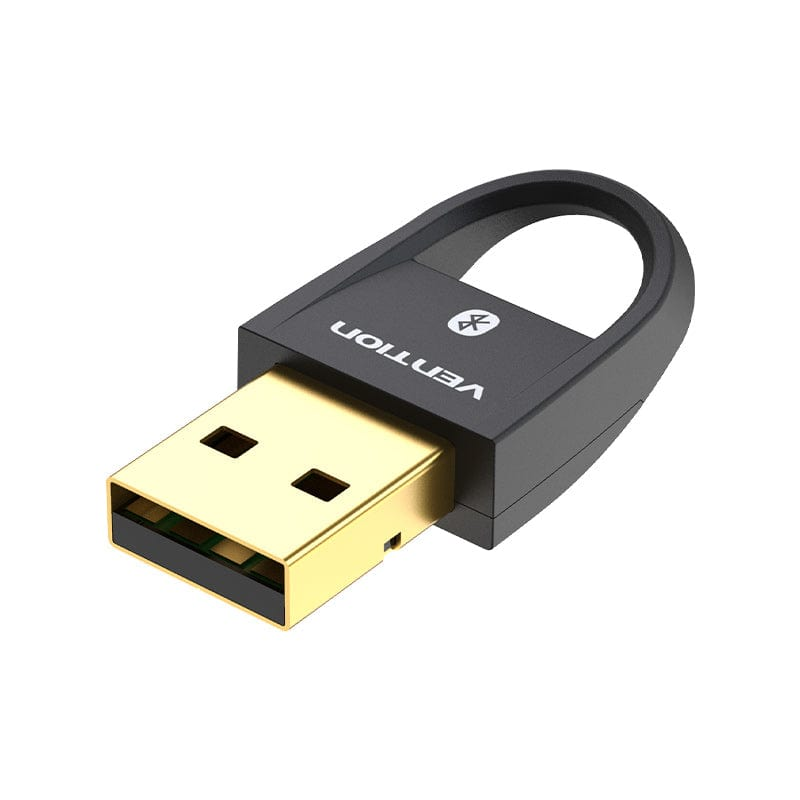
Vention USB Bluetooth 5.0 Adapter Black
The Vention USB Bluetooth 5.0 Adapter Black adds wireless Bluetooth connectivity to desktop computers, laptops, and other USB-equipped devices that lack built-in Bluetooth hardware. It enables users to connect peripherals such as wireless keyboards, mice, headphones, and speakers without physical cables. This adapter suits home users, professionals, and IT administrators looking to modernize existing equipment with current-generation Bluetooth technology.
Technical Specifications
Wireless Performance
- Bluetooth Version: 5.0
- Frequency Band: 2.4GHz (2.402–2.480GHz)
- Maximum Data Rate: 3Mbps
- Transmission Range: Up to 20 meters in typical indoor environments
- Channels: 79 channels (1MHz channel spacing)
Bluetooth Profiles Supported
- Audio: A2DP, AVRCP, HFP, HSP
- Input Devices: HID (Human Interface Device)
- File Transfer: OPP, FTP
- Networking: PAN, SPP
- Low Energy: GATT, GAP, SMP
Physical Characteristics
- Interface: USB 2.0 Type-A
- Dimensions: Approximately 18 × 15 × 7mm
- Weight: Under 5 grams
- Color: Black matte finish
- Form Factor: Nano (low-profile, no external antenna)
System Requirements
- Operating Systems: Windows 8/10/11, macOS 10.12+, Linux kernel 3.0+
- USB Port: Available USB 2.0 or 3.0 port
- No additional software: Required on Windows 10/11 and macOS
Power Consumption
- Operating Voltage: 5V via USB
- Typical Current Draw: Under 30mA during active use
- Idle Current: Under 5mA in standby mode
Environmental Specifications
- Operating Temperature: 0°C to 40°C
- Storage Temperature: -40°C to 70°C
- Humidity: 10% to 90% non-condensing
Compliance & Certification
- Regulatory: FCC, CE, RoHS compliant
- Bluetooth Certification: Bluetooth SIG certified
Use Cases and Applications
Wireless Peripheral Setup
Desktop computers without integrated Bluetooth can pair wireless keyboards, mice, and trackpads through the Vention USB Bluetooth 5.0 Adapter. Users eliminate cable clutter while maintaining responsive input performance. The Bluetooth 5.0 standard’s improved connection stability means fewer dropped inputs during productivity work or creative tasks.
Audio Device Connectivity
Home office workers and content creators connect Bluetooth headphones, earbuds, and speakers to computers that previously required wired audio connections. The A2DP profile supports high-quality stereo audio streaming, while HFP and HSP profiles enable microphone functionality for video calls. Additionally, AVRCP support allows playback controls directly from the connected audio device.
Smart Device and IoT Integration
Developers and smart home enthusiasts use BLE support to communicate with fitness bands, heart rate monitors, smart locks, environmental sensors, and other low-energy peripherals. The Bluetooth 5.0 standard’s improved data throughput benefits IoT applications requiring regular sensor polling. Linux compatibility makes the adapter well-suited for Raspberry Pi automation and monitoring projects.
Legacy System Modernization
Organizations running older workstations gain current-generation wireless peripheral support without hardware modifications or case opening. IT teams can standardize on a single adapter model across multiple computer generations, simplifying inventory management. The broad OS compatibility reduces deployment friction across mixed operating system environments.
Mobile Workstation Flexibility
Laptop users traveling between offices or working in co-working spaces can supplement weak or absent built-in Bluetooth with a reliable external solution. The adapter’s nano form factor means it can remain inserted during transport without risk of damage. For instance, users with older ultrabooks that support only Bluetooth 4.0 gain the improved range and speed of Bluetooth 5.0 through this upgrade.
Game Controller Connectivity
Gamers connect Bluetooth-compatible controllers to desktop PCs lacking native Bluetooth support. The adapter handles the low-latency requirements of gaming input devices while maintaining stable connections during extended sessions. However, users should verify their specific controller’s Bluetooth profile compatibility before purchasing.
Compatibility Considerations
The Vention USB Bluetooth 5.0 Adapter maintains backward compatibility with Bluetooth 4.x and earlier devices, though connections with older hardware operate at those devices’ maximum supported speeds rather than Bluetooth 5.0 speeds. Windows 10 and Windows 11 users benefit from native driver support without additional software installation. Windows 7 and Windows 8 users may require manual driver installation from the manufacturer’s documentation.
macOS users should note that some advanced Bluetooth audio codecs such as aptX or LDAC depend on the connected device’s codec support rather than the adapter alone. Standard SBC audio codec functionality works across all supported audio devices. Linux users with kernel version 3.0 or later benefit from built-in BlueZ stack support, which covers most common Bluetooth profiles without additional configuration.
The adapter operates on the 2.4GHz frequency band alongside Wi-Fi and other wireless devices. In environments with high 2.4GHz congestion, users may experience occasional interference. Bluetooth 5.0’s improved frequency hopping and adaptive channel selection help mitigate this in most practical environments.