
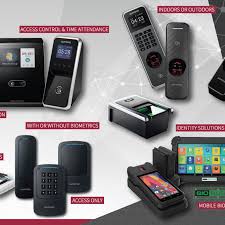
Suprema Biometric Access Control Systems in Kenya: Complete Selection and Deployment Guide
Suprema Biometric Access Control Systems protect facilities across Kenya from Nairobi corporate offices to Mombasa port facilities, replacing traditional keys and cards with fingerprint recognition, RFID credentials, and multi-modal authentication. Organizations deploying biometric systems eliminate unauthorized access, create detailed audit trails of entry events, and integrate access control with time attendance, visitor management, and security monitoring platforms. Understanding the technical capabilities and deployment requirements of different biometric devices helps organizations select appropriate solutions matching their security requirements, user capacity, environmental conditions, and budget constraints.
Suprema manufactures biometric access control devices ranging from compact desktop fingerprint scanners for enrollment stations to weatherproof outdoor terminals protecting perimeter gates. The product line includes specialized readers optimized for different deployment scenarios—government agencies requiring FBI PIV-certified scanners for identity verification, commercial facilities needing network-connected terminals integrated with building management systems, and industrial sites demanding ruggedized outdoor devices withstanding harsh environmental conditions. Selecting appropriate Suprema devices requires understanding fingerprint sensor technologies, RFID frequency standards, network communication protocols, and environmental protection ratings.
Understanding Biometric Authentication Technologies
Fingerprint recognition identifies individuals by analyzing unique ridge patterns, minutiae points, and other characteristics distinguishing one person’s fingerprints from another. The scanning process begins when a finger contacts the sensor surface, which captures a digital image using optical, capacitive, or thermal sensing technology. Processing algorithms analyze the captured image, extract distinctive features, create a mathematical template representing the fingerprint, and compare this template against stored references in the device database or access control server. Matching accuracy depends on sensor quality, algorithm sophistication, and template size—factors directly affecting false acceptance rates (FAR) and false rejection rates (FRR).
Optical fingerprint sensors illuminate the finger surface with LED light, capturing reflected light patterns through a camera system. These sensors work reliably across various finger conditions including dry, oily, or slightly dirty fingers. Optical technology dominates Suprema’s access control terminals because it delivers consistent performance in diverse environmental conditions common in Kenyan deployment scenarios. Sensor resolution measured in dots per inch (DPI) determines image quality—500 DPI optical sensors capture sufficient detail for accurate authentication while 1000 DPI sensors support high-security applications requiring detailed fingerprint analysis.
RFID (Radio Frequency Identification) technology supplements or replaces fingerprint authentication in scenarios requiring faster throughput, supporting users with fingerprint recognition difficulties, or maintaining compatibility with existing card-based systems. RFID readers transmit radio frequency signals activating passive credentials carrying unique identification codes. Two frequency standards dominate access control: 125kHz proximity cards (EM format) representing legacy systems deployed widely across Kenya, and 13.56MHz contactless smart cards (Mifare, DESFire formats) offering enhanced security through encryption and mutual authentication. Suprema terminals supporting dual-frequency RFID accommodate migration strategies where organizations transition from proximity cards to encrypted smart cards gradually.
Multi-modal authentication combines fingerprint and RFID verification, requiring users to present both credentials for access. This layered security approach prevents unauthorized access even if someone obtains a valid RFID card—they still need the registered fingerprint. Financial institutions, data centers, and government facilities deploy multi-modal authentication protecting high-value assets or sensitive information. The authentication process completes in under 2 seconds even with dual verification, maintaining acceptable throughput for typical door access scenarios. Advanced terminals like the Suprema FaceStation F2 combine facial recognition with fingerprint authentication, providing fusion multimodal verification with 4,000 matches per second processing capability.
FAP (Fingerprint Acquisition Profile) certification levels established by the FBI define minimum quality standards for fingerprint capture devices used in identity verification applications. FAP10 represents the lowest certification level suitable for basic authentication, capturing single finger images at 500 DPI resolution. FAP20 increases image area requirements, ensuring sensors capture sufficient fingerprint surface for reliable matching. FAP30 certification mandates larger capture areas and higher quality thresholds, supporting law enforcement, border control, and critical infrastructure applications. FAP45 represents the highest standard for ten-print capture used in criminal identification systems. Organizations should select FAP certification levels matching their security requirements and regulatory compliance obligations.
Desktop Fingerprint Scanners for Enrollment and Verification
Desktop fingerprint scanners serve enrollment stations, visitor registration desks, and identity verification checkpoints where operators capture fingerprints for database registration or authenticate individuals through supervised verification. These compact USB-connected devices integrate with Windows, Linux, and macOS computers through manufacturer-provided SDKs (Software Development Kits), enabling custom application development for specialized workflows. Government offices use desktop scanners capturing citizen fingerprints during ID document issuance, banks verify account holder identities during high-value transactions, and healthcare facilities authenticate patients accessing medical records.
The Suprema BioMini Slim 2 provides FAP20-certified fingerprint capture in an ultra-slim form factor measuring just 13.5mm thickness. This compact scanner features a 500 DPI optical sensor with Multi-Dynamic Range (MDR) technology ensuring optimal image capture under diverse lighting conditions, meeting FAP20 standards for reliable authentication across diverse user populations. The device employs Advanced Live Finger Detection (LFD) using machine learning to differentiate between live and fake fingerprints, enhancing security against spoofing attempts. Authentication speed completes in under 1 second with 1:10,000 matching capability, suitable for access control verification at security checkpoints or time attendance enrollment stations. The scanner connects via USB 2.0, drawing power from the connected computer without requiring external power adapters.
Organizations deploy BioMini Slim 2 scanners across multiple locations for distributed enrollment campaigns—mobile teams visit branch offices capturing employee fingerprints for centralized access control systems. Banks position these scanners at customer service desks, verifying account holder identities before processing sensitive transactions. Educational institutions use the devices during student registration periods, capturing biometric data for campus access control and examination verification systems. The scanner’s compact size and USB power make it ideal for laptop-based mobile enrollment scenarios where teams travel between locations enrolling users in remote facilities.
The Suprema BioMini Slim 3 upgrades the Slim 2 with FAP30 certification, capturing larger fingerprint images from a 16.5mm × 19.7mm sensor area. This increased capture area improves matching accuracy for challenging fingerprints—elderly users with worn ridge patterns, manual laborers with damaged fingerprints, or individuals with naturally faint fingerprint characteristics. The enhanced image quality supports higher security applications where false acceptance rates must remain below 1:100,000. Government agencies processing visa applications, law enforcement conducting background checks, and financial institutions verifying high-net-worth account holders benefit from FAP30 certification’s superior accuracy.
Technical specifications distinguish the Slim 3 from the Slim 2 beyond just FAP certification. The Slim 3 employs improved optical components reducing ambient light interference, enabling reliable fingerprint capture in brightly lit environments like outdoor registration tents or sunny office spaces common in Kenya. Enhanced algorithm processing accommodates wider finger placement angles, reducing operator training requirements and improving user experience during enrollment sessions. The device supports both 1:1 verification (comparing captured fingerprint against specific stored template) and 1:N identification (searching entire database for matches), with 1:10,000 search capability completing in under 2 seconds.
The Suprema BioMini Plus 2 achieves FBI PIV (Personal Identity Verification) certification for federal identity credential applications alongside FAP10 certification. This dual certification qualifies the device for government applications requiring compliance with PIV standards while maintaining cost-effectiveness through the lower FAP10 tier. The scanner captures single fingerprint images at 500 DPI resolution with 256 grayscale levels, providing detailed image data suitable for template extraction and quality assessment. The IP65-rated sensor surface provides scratch-proof protection against dust and water, ensuring durability in mobile deployment scenarios.
PIV certification requirements extend beyond fingerprint image quality to encompass security features protecting captured biometric data. The BioMini Plus 2 implements LFD technology recognizing fake fingerprints made from clay, rubber, silicon, glue, paper, and film. The device’s dual-CPU architecture and Suprema’s award-winning fingerprint algorithm—recognized by FVC and NIST MINEX as the most compatible and accurate algorithm—deliver exceptionally low error rates and quick verification speeds. The USB 2.0 high-speed interface enables quick data transmission, while multi-threaded code design supports multiple device connections simultaneously for high-throughput enrollment operations.
Kenya government offices deploy desktop scanners for citizen services including national ID registration, passport application processing, and various licensing procedures requiring identity verification. County governments capturing biometric data for local resident registration, voter registration commissions enrolling voters ahead of elections, and examination boards verifying candidate identities all utilize desktop scanners’ mobility and ease of deployment. Organizations should budget KES 25,000-45,000 per desktop scanner depending on FAP certification level, with FAP10 devices at lower price points and FAP30/PIV certified models commanding premium pricing reflecting their enhanced capabilities.
Network-Connected Access Control Terminals
Access control terminals mount at door entry points, gates, and restricted area perimeters, providing standalone or network-connected fingerprint and RFID authentication. These devices contain onboard memory storing user templates, transaction logs, and access rules, enabling continued operation even during network failures. Terminal processors execute authentication locally within the device, comparing presented fingerprints against stored templates without requiring server connectivity for each verification. This distributed intelligence architecture delivers sub-second authentication speeds regardless of network latency while creating resilient systems tolerating communication failures.
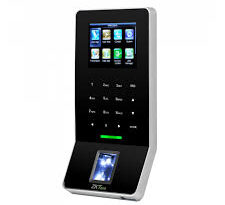
The Suprema BioEntry R2 delivers compact fingerprint and dual-frequency RFID authentication in a slim 32mm depth enclosure suitable for space-constrained installations. The device incorporates a 500 DPI optical fingerprint sensor capturing templates in under 0.5 seconds with less than 1% false rejection rate under normal operating conditions. Onboard memory stores up to 3,000 fingerprint templates and 10,000 RFID card credentials, supporting small to medium-sized facilities without requiring constant server connectivity. Transaction log capacity reaches 50,000 events, recording entry attempts, granted access, denied access, and duress alarm activations with timestamps and user identification.
Dual-frequency RFID capability accommodates both 125kHz EM proximity cards and 13.56MHz Mifare/DESFire smart cards through a single reader, simplifying migration from legacy card systems to encrypted credentials. Organizations can issue proximity cards to contractors and temporary visitors while employees use secure smart cards or fingerprints, implementing tiered security matching different user risk profiles. The RFID reading distance extends to 5cm for proximity cards and 3cm for smart cards, requiring deliberate card presentation rather than accidental activation from cards in pockets or bags.
Communication interfaces include TCP/IP for network connectivity, RS485 for legacy controller integration, and Wiegand output for connecting to third-party access control panels. The TCP/IP interface enables direct connection to Suprema’s BioStar 2 access control platform through standard network switches, eliminating separate controller hardware for simple installations. Power over Ethernet (PoE) support following IEEE 802.3af standards simplifies installation by delivering both data connectivity and electrical power through a single Cat6 cable, reducing installation labor and eliminating separate power supplies at each door location.
The BioEntry R2 suits indoor office environments, residential apartment buildings, and commercial facilities requiring compact authentication devices at standard doorways. Organizations deploy these terminals at main entrance doors, server room access points, executive office entrances, and storage areas containing valuable equipment or sensitive documents. Installation requires mounting the terminal at 1.4-1.5 meter height for comfortable user interaction, running Cat6 cable to network switches supporting PoE, and configuring network parameters through the device’s built-in web server interface accessed via standard browsers.
The Suprema BioEntry W2 enhances the R2 platform with IP67/IK09 weatherproof and impact protection, operating reliably in semi-outdoor environments exposed to rain, dust, and temperature variations. The IP67 rating guarantees protection against dust ingress and immersion in up to 1 meter water depth for 30 minutes—though practical deployments typically encounter rain exposure rather than submersion. The IK09 impact rating withstands 10 joules of impact energy, protecting against vandalism attempts with thrown objects or tool strikes. Weather sealing protects the fingerprint sensor, RFID antenna, electronics, and connector interfaces from moisture infiltration causing corrosion and failure in outdoor applications.
Operating temperature range extends from -20°C to 60°C, accommodating Kenya’s diverse climate zones from cool highland regions to hot coastal areas. Mombasa deployments face temperatures reaching 32-35°C with high humidity and salt-laden air requiring corrosion-resistant enclosures. Nairobi installations operate in 15-25°C ranges but must withstand occasional temperature extremes during heat waves. The BioEntry W2 features Suprema’s next-generation Live Finger Detection technology using dual light source imaging—infrared and white light—to block fake fingerprints made from various materials including clay, rubber, silicon, glue, paper, and film.
Technical specifications match the BioEntry R2 with 3,000 fingerprint capacity, dual-frequency RFID supporting both 125kHz and 13.56MHz cards, and TCP/IP, RS-485, and Wiegand connectivity options. The enhanced environmental protection adds minimal cost over indoor models while significantly extending deployment options. Organizations install BioEntry W2 terminals at parking garage pedestrian doors, outdoor storage facility gates, perimeter fence access points, and building exterior doors with covered entryways providing partial weather protection. These semi-outdoor locations benefit from weatherproofing without requiring the full ruggedization of terminals designed for completely exposed outdoor mounting.
The Suprema BioEntry P2 provides network-connected fingerprint and dual RFID authentication in a compact IP65-rated enclosure supporting both indoor and outdoor deployment. The device features Suprema’s OP6 optical sensor capturing 500 DPI fingerprints with template capacity reaching 5,000 users and transaction log storage for 100,000 events. The powerful 1.0GHz CPU coupled with Suprema’s latest fingerprint algorithm delivers class-leading performance with authentication completing in under 1 second even when searching the full 5,000-user database.
Increased capacity compared to the R2 and W2 models suits larger facilities—manufacturing plants with 500-1,000 employees, educational institutions with thousands of students and staff, or commercial buildings with extensive tenant populations. Authentication speed maintains acceptable throughput during shift changes when dozens of employees authenticate simultaneously. The device implements advanced matching algorithms reducing false rejection rates even for challenging fingerprints, minimizing user frustration and security guard intervention during authentication failures. Configurable authentication modes include fingerprint only, card only, card+fingerprint, or card or fingerprint, allowing security administrators to set appropriate verification requirements matching different access zones’ security levels.
Integration with Suprema’s BioStar 2 access control platform enables centralized user management, real-time monitoring, and sophisticated access rules spanning multiple buildings and sites. Security administrators provision new users, revoke departed employee credentials, adjust access permissions, and monitor entry events across the entire organization from a single management console. The system supports hierarchical access levels—executives accessing all floors, department staff limited to specific zones, and visitors restricted to reception areas and meeting rooms. Time-based access rules grant entry only during authorized hours, automatically denying after-hours access except for designated personnel.
Advanced Multi-Modal Terminals
Organizations requiring enhanced security and user convenience deploy multi-modal terminals combining multiple authentication methods. The Suprema FaceStation F2 provides fusion multimodal authentication combining facial recognition and fingerprint verification for maximum security. Built on Android 8.1 platform with a 1.4 GHz quad-core CPU, the terminal delivers the world’s fastest matching speed of up to 4,000 matches per second for facial authentication.
The FaceStation F2 employs Suprema’s latest facial authentication algorithm with advanced anti-spoofing technology preventing unauthorized access through photos, videos, or masks. The system detects users without masks and recognizes those wearing them—a critical capability for health-conscious environments post-pandemic. Face template storage accommodates up to five facial images per user, ensuring smooth authentication despite changes in facial hair, glasses, or makeup. Operating across lighting conditions from 0 lux to 25,000 lux enables reliable day and night operation without supplemental illumination.
The terminal encrypts all biometric credentials and personal information, protecting data with a secure boot process. Touchless facial recognition reduces contact points improving hygiene while maintaining authentication speeds suitable for high-traffic entrances. Organizations deploy FaceStation F2 at healthcare facilities requiring contactless authentication, corporate headquarters implementing premium security, and manufacturing facilities where workers wear gloves or have dirty hands preventing reliable fingerprint capture.
For organizations requiring basic RFID access with enhanced monitoring, the Suprema X-Station provides an IP access control terminal with 3.5-inch touchscreen LCD and built-in camera for face detection. The terminal captures human face images after card/PIN authorization, preventing unauthorized access attempts and payroll fraud through buddy-punching. Four separate configurable function keys support time and attendance events including in/out and duty tracking, offering quick attendance checking for workforce management applications.
BioStar 2 Access Control Platform
BioStar 2 serves as Suprema’s enterprise access control software managing user enrollment, credential provisioning, access rule configuration, real-time monitoring, and event reporting across distributed terminal networks. The web-based platform operates on Windows Server infrastructure or Linux servers, accessed through standard web browsers without requiring client software installation on administrator workstations. This browser-based architecture simplifies deployment across organizations with multiple locations—security staff at branch offices access the centralized management console without local software installation or maintenance.
User management capabilities centralize enrollment workflows where security administrators create user accounts, capture or import fingerprint templates, issue RFID credentials, and assign access permissions across multiple doors and buildings. The platform supports bulk import from CSV files or Active Directory integration, enabling rapid provisioning when onboarding large employee populations. Fingerprint template capture occurs at designated enrollment stations equipped with desktop scanners or directly at installed access terminals during supervised registration sessions.
Access level configuration defines which users can access which doors during what time periods. Security administrators create access groups—for example, “First Floor Employees” granted access to building entrance and first floor offices during business hours, “IT Staff” permitted 24/7 access to server rooms, and “Executives” authorized for all floors including restricted conference rooms. Individual users receive one or more access group memberships determining their permissions across the facility. This group-based approach scales efficiently to large organizations where managing individual door permissions for hundreds of users becomes impractical.
Time zone scheduling implements temporal access restrictions, automatically granting or denying access based on time-of-day and day-of-week criteria. Manufacturing facilities configure access rules granting factory floor access only during shift hours, automatically locking doors during non-production periods. Office buildings implement after-hours lockdown except for designated security and maintenance personnel. Educational institutions schedule access matching class schedules, preventing student entry during examination periods or school holidays.
Real-time monitoring displays authentication events as they occur, showing which users accessed which doors, denied access attempts, held-open door alarms, and forced entry detections. Security personnel monitor live event feeds identifying unusual patterns—terminated employees attempting access after separation, credential sharing between users, or repeated authentication failures suggesting password attacks or malfunctioning readers. The monitoring interface highlights critical events through color coding and alert notifications, ensuring security staff notice important events amid normal access activity.
Event reporting generates historical analysis of access patterns, attendance records, and security incidents. Human resources departments extract attendance reports showing employee arrival and departure times, total hours worked, and overtime calculations. Security teams investigate incidents by querying event logs for specific users, doors, or time periods—for example, determining who accessed the server room during a weekend when unauthorized configuration changes occurred. Compliance audits utilize access logs demonstrating proper implementation of security policies and access restrictions.
Integration capabilities connect BioStar 2 with video management systems, alarm monitoring platforms, and building automation systems creating comprehensive facility management solutions. Video integration automatically retrieves camera footage corresponding to access events—denied access attempts trigger video recording review, investigating why authentication failed. Alarm integration connects access control with intrusion detection, automatically arming alarm zones when the last authorized user exits buildings. Building automation integration links access control with HVAC and lighting systems, reducing energy consumption by powering down unoccupied areas based on access activity.
System Design and Installation Requirements
Access control system design begins with door inventory identifying all access points requiring authentication, existing hardware (locks, strikes, door closers), and electrical infrastructure (power outlets, network cabling). Each door requires assessment of traffic volume, security classification, environmental conditions, and existing card reader compatibility determining appropriate terminal selection. High-traffic main entrances need faster authentication speeds than low-volume executive suite doors. Outdoor gates require weatherproof terminals while interior office doors accept compact indoor readers.
Network infrastructure planning determines whether TCP/IP connectivity reaches all door locations or whether RS485 controllers provide local wiring aggregation. Modern installations favor TCP/IP connectivity deploying PoE network switches reaching each terminal location, simplifying installations and enabling future expansion. Legacy facilities with existing RS485 controllers can integrate Suprema terminals through Wiegand connections, preserving infrastructure investments while upgrading authentication technology. Organizations should budget for network switch ports providing PoE—each terminal consumes 15.4 watts under IEEE 802.3af PoE standard, requiring switch capacity calculations ensuring adequate power budget across all ports.
Power backup systems prevent access control failure during utility outages common across Kenya. Critical entry points require UPS protection maintaining authentication capability during power failures—employees must access facilities during outages to address emergency situations or protect critical equipment. UPS systems supporting access control infrastructure should provide 1-2 hours runtime powering network switches, servers, and connected terminals. Organizations can selectively power essential doors during outages, allowing building access while non-critical interior doors fail secure (remain locked) until power restoration.
Electric lock selection matches door construction, fire code requirements, and security classification. Standard mortise locks integrate with electromagnetic strikes installed in door frames, releasing when valid authentication occurs. Electromagnetic locks (maglocks) provide simpler installation on metal door frames but require fail-safe operation allowing emergency egress during power failures. Fail-secure locks remain locked during power failures, requiring UPS backup for continued access or emergency release buttons providing exit capability without power. Organizations must consult fire marshals and building inspectors ensuring access control installations comply with emergency egress regulations preventing people from being trapped during evacuations.
Door position monitoring through magnetic contact switches detects whether doors close properly after access, triggering held-open alarms when doors remain ajar beyond configured timeout periods. Request-to-exit (REX) sensors inside controlled areas detect egress attempts, unlocking doors without authentication for authorized exit while maintaining security against unauthorized entry. These auxiliary inputs connect to access terminals through dedicated input circuits, integrated into the BioStar 2 monitoring system alongside authentication events.
Installation procedures begin with terminal mounting at 1.4-1.5 meter height for comfortable fingerprint sensor and RFID reader access. Wall mounting using the provided bracket and tamper-resistant fasteners provides secure installation resisting removal attempts. Cable runs from terminals to network switches should follow building code requirements for low-voltage wiring—concealed conduit in walls for professional installations or surface-mount raceway for retrofit applications. Proper cable termination using RJ45 connectors and keystones ensures reliable network connectivity without intermittent faults from poor connections.
Kenya Deployment Considerations and Cost Planning
Kenya’s electrical infrastructure challenges require access control systems accommodating frequent power interruptions and voltage variations. Urban areas experience brief outages lasting minutes to hours during grid maintenance and load shedding. Rural locations face extended outages during storms or equipment failures. Access control installations must implement UPS backup for network switches and servers ensuring continued operation during typical outage durations—30-60 minutes for urban facilities, 2-4 hours for critical rural installations with less reliable grid service.
Voltage fluctuations outside standard 220V ±10% tolerances damage electronic equipment lacking proper input protection. Suprema terminals include wide input voltage acceptance but organizations should deploy voltage regulators or UPS systems with automatic voltage regulation protecting entire access control infrastructure. Nairobi facilities generally experience stable voltage with occasional brownouts during peak demand. Coastal regions and rural areas encounter wider voltage swings requiring more robust power protection strategies.
Network connectivity options vary by location and organization. Urban facilities typically deploy wired Ethernet infrastructure connecting terminals via structured Cat6 cabling to central network switches. This wired approach provides reliable connectivity with minimal latency for real-time monitoring and quick authentication. Some deployments implement WiFi connectivity using industrial wireless access points, avoiding cable installation costs in buildings with challenging routing—historical structures with solid masonry walls, temporary facilities, or locations where cabling disrupts operations.
Climate considerations affect terminal selection and installation planning. Nairobi’s temperate climate with 15-25°C average temperatures suits standard terminal specifications without additional thermal management. Mombasa’s hot humid coastal environment with 32°C peaks and 80%+ humidity requires careful attention to ventilation preventing condensation inside electronics. Arid northern regions including Turkana and Marsabit experience extreme temperature ranges and dust infiltration demanding IP65+ rated terminals for reliable operation. Organizations should select environmental ratings exceeding actual conditions anticipated, providing safety margin against occasional weather extremes.
Import duties and Value Added Tax affect total system costs significantly. Electronic security equipment including access control terminals, controllers, and readers fall under Kenya Revenue Authority classifications attracting 25% import duty plus 16% VAT on the duty-inclusive value. Organizations should calculate landed costs accounting for these taxes rather than using manufacturer list prices—a USD $200 terminal costs approximately KES 36,000 landed (at KES 120/USD exchange rate with duties and VAT). Working with established local distributors like Proftech Power Systems simplifies import procedures, customs clearance, and warranty support compared to direct importation requiring specialized customs knowledge.
Cost planning should encompass complete system expenses beyond terminal hardware. BioStar 2 software licensing costs vary by supported door count and advanced features—basic licenses support unlimited doors with core access control functionality while professional licenses add time attendance, visitor management, and video integration at premium pricing. Installation labor typically equals 30-50% of hardware costs for professional installations including cabling, electric lock installation, and network infrastructure. Organizations should budget for training security staff on system administration, ongoing support contracts, and eventual terminal replacement as devices age beyond economic repair periods.
System scalability planning anticipates future expansion requirements. Organizations installing access control at headquarters facilities typically expand to branch offices subsequently, requiring architecture supporting distributed deployments. BioStar 2 supports multiple server configurations—single server for small organizations, distributed servers at each site for large enterprises, or cloud-hosted deployment for organizations lacking IT infrastructure. Initial installations should implement database structures and network architectures accommodating expected growth without requiring complete system replacement during expansion phases.
Maintenance requirements include periodic cleaning of fingerprint sensors removing accumulated oils and dust affecting image quality. Security staff should clean sensors monthly using isopropyl alcohol and lint-free cloths, preventing gradual degradation of authentication performance. Quarterly testing verifies system functionality including authentication speed, communication reliability, and backup power operation. Annual professional service contracts provide expert inspection, firmware updates addressing security vulnerabilities, and hardware replacement for worn components before failures occur.
Suprema biometric access control systems provide organizations across Kenya with reliable authentication solutions protecting facilities from unauthorized access while creating detailed audit trails documenting entry events. Proper device selection matching deployment requirements with appropriate fingerprint sensors, RFID capabilities, environmental protection, and network connectivity delivers systems serving organizational needs efficiently. Understanding technical specifications, deployment considerations, and system design principles enables organizations to implement access control solutions providing years of dependable service protecting assets, information, and personnel while maintaining user convenience and operational efficiency during daily access activities.
 No products in the cart.